Library-first
SQLite remembers file state across restarts, so large libraries do not start from zero after every deployment.
Install it, configure safe encoding rules, operate a multi-node cluster, automate it through the JSON API, and recover confidently when something goes wrong.
Snacks scans video and music libraries, evaluates each file against your target codec and bitrate rules, builds an FFmpeg command, validates the result, and keeps the output only when it satisfies the configured policy. It can run as a web container on a NAS, as an Electron desktop application, or as a distributed cluster.
SQLite remembers file state across restarts, so large libraries do not start from zero after every deployment.
NVIDIA, Intel, AMD, Apple VideoToolbox, and CPU paths are selected according to platform and configured device slots.
Retries, fallbacks, persistent logs, output verification, and cluster reassignment protect long-running sweeps.
services:
  snacks:
    image: derekshreds/snacks-docker:latest
    container_name: snacks
    network_mode: host
    volumes:
      - /path/to/media:/app/work/uploads
      - /path/to/snacks/logs:/app/work/logs
      - /path/to/snacks/config:/app/work/config
    environment:
      - ASPNETCORE_ENVIRONMENT=Production
      - SNACKS_WORK_DIR=/app/work
      - FFMPEG_PATH=/usr/lib/jellyfin-ffmpeg/ffmpeg
      - FFPROBE_PATH=/usr/lib/jellyfin-ffmpeg/ffprobe
restart: unless-stoppedhttp://NAS-IP:6767.
Snacks configures its listener explicitly, so the generic ASP.NET variables
(HTTP_PORTS, DOTNET_URLS) are ignored. How to move off
6767 depends on the network mode:
ports: mappings under network_mode: host. Set the port through
the one variable Snacks honors:
environment:
- ASPNETCORE_URLS=http://0.0.0.0:70700.0.0.0 host so the UI and cluster peers can reach it over the LAN.
network_mode: host and map the
host port onto the container's default instead — no environment variable needed:
ports:
  - "7070:6767"
Cluster nodes announce whatever port they actually bound, so a custom port is safe with
discovery. The UDP discovery port 6768 itself is fixed.
Install the Windows or Apple Silicon macOS build, launch Snacks, and use
Browse Library. The desktop wrapper starts the ASP.NET backend
locally and bundles or points it at FFmpeg. Cluster mode intentionally changes the
backend from localhost-only to a LAN listener. There is no port to configure: the
wrapper prefers 6767 and automatically starts on another free port when
it is taken.
A manual process action is explicit: it can force a mux pass even when the source is already at the video target, allowing audio/subtitle rules and output-container normalization to be applied. Automatic scanning uses the normal eligibility rules.
| State | Meaning | What happens next |
|---|---|---|
Pending | Waiting for a local or remote slot. | Processed according to priority and queue policy. |
Uploading | Source is moving to a worker. | Becomes Processing after transfer and verification. |
Processing | FFmpeg is running. | Progress and log lines arrive through SignalR. |
Downloading | Cluster output is returning to the master. | The master validates and places it. |
Completed | Validated output was kept. | Terminal. |
NoSavings | Output was valid but not worth keeping under the size policy. | Terminal unless explicitly retried. |
Failed | Retry paths were exhausted. | Inspect logs, adjust settings, then retry. |
Stopped | Removed for now. | May reappear on a later automatic scan. |
Cancelled | Explicitly marked “do not reprocess.” | Only a manual selection queues it again. |
| Area | Key choices | Guidance |
|---|---|---|
| Mode | Transcode, mux-only, or hybrid | Hybrid is useful when track/container cleanup matters even for already-efficient video. |
| Video | H.264, HEVC, AV1; bitrate; hardware encoder | Choose compatibility first. AV1 may be slow or unsupported on older playback devices. |
| Resolution | Never, cap at target, always; fixed frame; FPS cap | A fixed frame overrides normal downscale behavior and adds padding when required. |
| HDR | Preserve or tone-map to SDR | Validate color and brightness with real HDR sources before a batch. |
| Audio | Languages, original tracks, output profiles | Use ISO language preferences and verify files with missing/incorrect language tags. |
| Subtitles | Languages, sidecars, OCR, image pass-through, SDH exclusion | PGS/VobSub OCR needs Tesseract data and is more expensive than text subtitle handling. |
| Output | Container, output directory, scratch directory, original replacement | Scratch should have enough free space for source-scale temporary files. |
| Reliability | Retry, log retention, deep-verification budget | Use a nonzero verification budget to continuously sample older library entries. |
| Queue | Bitrate-first or newest-first | Newest-first is best when recent downloads should jump ahead of a backlog. |
Add und (Undetermined) to either Languages to Keep list
when you want to retain audio or subtitle tracks whose language tag is missing, empty,
und, mul, zxx, or otherwise unrecognized. Its
position in the list controls output order like any other language. A recognizable
language tag or a language-bearing title still wins, so an und-tagged track
titled “English SDH” is treated as English rather than undetermined. Leaving the keep
list empty continues to keep all tracks.
Advanced Video is an optional layer under Settings → Video. It is off by default and upgrades never change it: until you enable it, existing settings, presets, watched folders, skip decisions, and FFmpeg behavior remain unchanged. Enable it only after creating and validating at least one profile. Audio, subtitles, container, paths, and file handling continue to come from the ordinary settings; profiles are deliberately video-only.
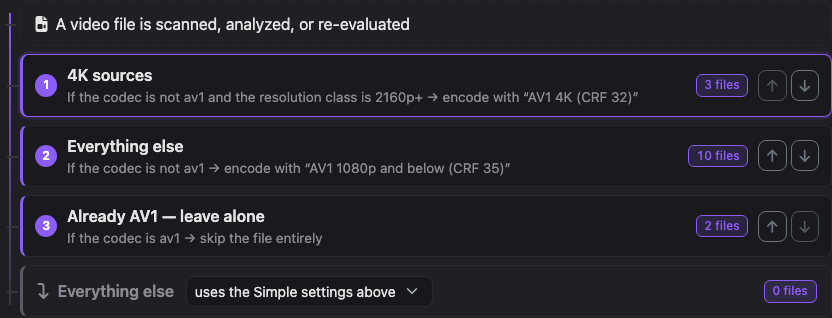
The panel is organized as three numbered steps that mirror how a decision actually happens: a decision flow of plain-language rule cards every video falls through top to bottom (the first match wins — visibly), the encoding recipes those rules pick (recipes are the UI name for video profiles), and a live library impact preview that runs the staged, unsaved flow against every video Snacks knows about and shows exactly how many files each rule catches and what would happen to them — before anything is applied.
A recipe (video profile) selects H.264, HEVC, or AV1; automatic or one exact detected encoder; bitrate, quality, or custom rate control; preset/speed, threads, pixel format, GOP, codec profile/level, transformations, extra filters, guarded options, and output retention. The editor shows the FFmpeg video arguments the recipe generates as you type.
Enabled rules run top to bottom and the first match wins. Each card reads as a sentence — “If the codec is not av1 and the resolution class is 2160p+ → encode with AV1 4K” — with a live count of the library files it catches. A rule uses a flat All or Any condition list; there are no scripts, expressions, or nested condition trees.
The impact section is read-only: it never queues, re-evaluates, or saves anything. It applies the same shared resolver used by scanning and dispatch — including per-folder policies — to every tracked video and buckets the outcomes with example files, current disk usage, and how many files in each bucket were already processed, so a mistake is visible as a wrong-looking bar instead of a surprise batch of jobs. Bitrate recipes also show an approximate output size (target × duration); quality and custom recipes deliberately show no forecast, because their size genuinely depends on content. A search box answers "what happens to this file" by name, and once encodes complete, a Measured so far strip shows each recipe's real jobs, savings, and average output bitrate next to the forecast. Very large libraries are analyzed as a uniform random sample beyond 20,000 videos and labeled as such.
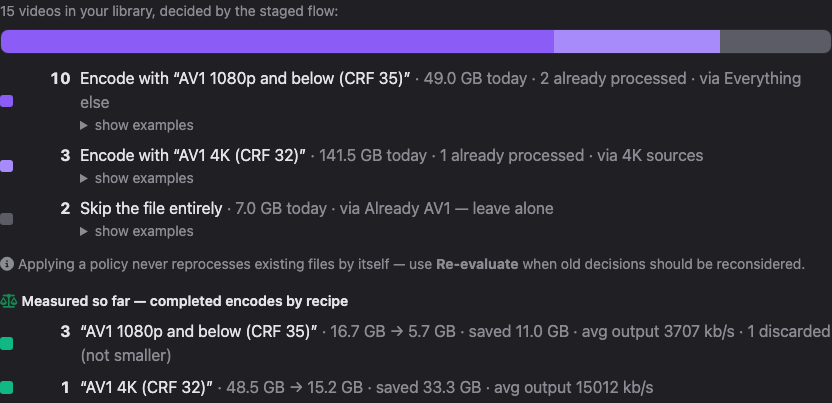
Applying a policy only changes future decisions. Files already in the catalog keep their current status until Re-evaluate runs — the impact panel says so and offers the button right after an apply. Rules the flow can never reach are flagged inline ("never reached — an earlier rule always claims these files first") by a conservative static analysis that only reports what it can prove.
A policy exports as a plain snacks-video-policy.json file and imports on
any Snacks instance; imports arrive as a staged draft with fresh internal ids and
nothing applies until Validate & Apply. The current draft can also be saved as a
named template that appears alongside the built-in quick-start cards. Exact-encoder
recipes may name any adapter-known encoder — including ones no connected node
advertises yet, labeled "not detected yet" — so a policy can be written today for
hardware that joins the cluster tomorrow.
Conditions can inspect normalized codec aliases, width, height, short-edge resolution
class (SD, 720p, 1080p, 1440p, or 2160p+), video bitrate, file size, duration, pixel
format, derived bit depth, HDR, and 4K. Unknown values match only
IsUnknown; numeric ranges include both endpoints.
| Action | Behavior |
|---|---|
UseSimpleSettings | Runs the established codec/bitrate/filter/mux skip ladder unchanged. |
TranscodeWithProfile | Forces video re-encoding with the complete selected profile, even when legacy bitrate checks would skip. |
MuxOnly | Copies video and runs only applicable container, audio, and subtitle work; files with no mux work remain skipped. |
Skip | Skips the entire job, including mux-only work. |
The encoder picker is populated from the configured FFmpeg binary and connected workers. An exact encoder is never remapped or replaced by a retry fallback. If no local or protocol-compatible worker advertises that exact name on the assigned device, the job remains Pending and shows why. Older workers can still run Simple jobs, but cannot receive resolved Advanced plans.
Each custom row stores one option and at most one literal value token. Encoder-private
controls such as -aom-params are allowed and appended after generated video
settings so an intentional duplicate wins with a warning. Inputs, outputs, maps,
muxers, audio/subtitle controls, progress/report controls, and replacement filtergraphs
are rejected. Additional filters belong in the dedicated ordered single-chain field.
FFmpeg is started with an argument vector, never through a shell; the displayed command
is only a readable preview.
The fastest way in is the Quick start gallery at the top of the Advanced Video panel. Each template stages a complete working policy — profiles, rules, and default action — and immediately shows its validation result and the FFmpeg arguments it would generate. Nothing is saved until you press Validate & Apply, so a template is also a safe way to explore how profiles and rules fit together before building your own.
-aom-params rows. Requires an FFmpeg build with libaom.The expert template stages all of the following in one click; the same policy can be built by hand:
libaom-av1, then choose Quality.yuv420p10le, GOP 300, and Always Keep.-aom-params as separate guarded rows; use Validate Preview to inspect exact tokens.codec is not AV1 plus resolutionClass is 2160p+ and select a 4K profile.
A complete importable block for that scenario lives at
examples/advanced-video-policy.json. Full-app user presets include this
block. Applying a built-in Simple preset disables Advanced Video without deleting its
profiles or rules, so it can be turned back on later.
Snacks stages output separately from the source, validates the result, and only then performs final placement. Encoding never writes into the source file in place. Keep Replace original files disabled until the chosen settings have been tested with the playback clients and media types that matter to you.
[snacks] is treated as previously produced output and is not automatically fed back into the pipeline.| Configuration | Result |
|---|---|
| No output directory; replacement off | Movie [snacks].mkv is placed beside the original, which remains untouched. |
| Output directory; replacement off | The tagged output is kept in that directory and the original stays in place. |
| Scratch/encode directory configured | Temporary output is created there, then moved to the requested final destination after validation. |
| Replacement on | The validated output is moved into the source directory with the [snacks] tag removed; replacement happens only during final placement. |
| Music: Delete original file after success on | Works like video replacement: the output drops the [snacks] tag and replaces the source in its own folder, under the source's name; a music output directory only holds the encode until then. Music always follows its own output-directory and delete settings, including for cluster encodes; the video Replace original files toggle does not apply to it. |
Sidecar files produced during processing move with the output. A stale tagged output
left by an interrupted attempt is removed before FFmpeg starts again. If an ordinary
encode is not smaller than its source, Snacks discards it as NoSavings;
intentional remuxes, explicitly configured audio-output growth, and Advanced profiles
set to AlwaysKeep are retained.
Retries are selected from the failure itself, so not every job uses every stage. The normal escalation order is:
Failed partial output is cleaned between attempts. When all retries are exhausted, the source remains unchanged and the final reason is stored in the job log and catalog. The music path is deliberately simpler: it validates duration and discards empty, invalid, or no-savings output instead of using the video retry ladder. Exact Advanced encoders may retry decoding/subtitle handling, but never enter the encoder-substitution step.
Auto-scan keeps a persistent catalog, watches one or more folders, and periodically finds new or materially changed media. A file modified in the last 30 minutes is skipped to avoid reading it during a transfer.
A known path is treated as replaced media when its size changes by more than 10% or its
duration changes by more than 30 seconds. It is then probed and evaluated as new work.
Previously processed rows are retained in SQLite across restarts, failed files carry a
failure count, and interrupted [snacks] output is cleaned before retrying.
ScanProgress / AutoScanCompleted or the UI status.filenamePatterns: glob-style patterns such as *REMUX* or sample?.mkv; applies to video and music.minSizeGBToSkip: skips video or music files at or above the threshold.excludeResolutions: video-only labels such as 2160p, 1080p, or 720p. Snacks classifies by the larger of the real height and the 16:9 height derived from the width, so widescreen 1920×1080 media is 1080p and an ultra-wide 1920×800 master still buckets as 1080p.Analyze uses the same exclusions as a real scan and reports excluded files without queueing them. An explicit manual Process Item is a force-add and bypasses exclusions, which lets you process a deliberately excluded file when needed.
A master owns the authoritative queue and catalog. Worker nodes advertise capabilities, accept assigned files, encode them, and return verified output. Major version compatibility is checked during discovery.
6767 (see Changing the port); nodes announce the port they actually bound.6768 (fixed).Shared storage avoids source/output transfer when both sides can access the same share. Workers fail closed: configure explicit input and output allowlists. If mount points differ, add master-prefix → worker-prefix rewrites; the longest matching prefix wins. If either side cannot safely use the shared path, Snacks falls back to normal transfer.
| Encoder family | Docker / Linux | Windows | macOS |
|---|---|---|---|
| NVIDIA | NVENC through CUDA runtime | NVENC | — |
| Intel | VAAPI | QSV | — |
| AMD | VAAPI | AMF | — |
| Apple | — | — | VideoToolbox H.264/HEVC |
| Software | x264, x265, SVT-AV1 | x264, x265, SVT-AV1 | x264, x265, SVT-AV1 |
/dev/dri/renderD* node, so an Intel iGPU can still be found when a discrete GPU owns renderD128.privileged: true because its video/render group layout differs from conventional Linux hosts. Unraid normally uses group access instead; follow unraid/README.md.
Passing /dev/dri or enabling privileged mode is not enough for NVENC.
Install the NVIDIA Container Toolkit on the host and configure the NVIDIA runtime:
runtime: nvidia
environment:
  - NVIDIA_VISIBLE_DEVICES=all
- NVIDIA_DRIVER_CAPABILITIES=compute,video,utilityAdd this to the Docker service when the host should monitor application liveness:
healthcheck:
  test: ["CMD", "curl", "-f", "http://localhost:6767/api/health"]
  interval: 30s
  timeout: 10s
  retries: 3
  start_period: 40s
The maintained QNAP example is deploy-compose.yml. Typical media roots are
/share/CACHEDEV1_DATA/Multimedia or /share/Public on QNAP and
/volume1/video or /volume1/Media on Synology.
Luna can privately inspect selected Sonarr/Radarr metadata, search their catalogs, and add movies or series you explicitly request. Snacks stays inside your network: it polls Luna over an outbound connection, executes a small typed action locally, and returns a path-free result. No port forwarding or public Snacks URL is required.
https://veryluna.com. Luna's source and self-hosting environment are private;
there is no public self-hosted Luna distribution. Custom URLs exist only for the project
owner's explicit local integration testing.
localhost means the Snacks container—not the Docker host or NAS.https://veryluna.com. Do not substitute another Luna endpoint.https://veryluna.com in normal deployments.| Where a service runs | Address to enter in containerized Snacks |
|---|---|
| Official VeryLuna service | https://veryluna.com |
| Project owner's isolated integration test | http://luna:8080 only with both explicit local-testing overrides |
| Radarr/Sonarr published on the Docker host | http://host.docker.internal:7878 / :8989 |
| Radarr/Sonarr on a NAS or another machine | The machine's LAN URL, such as http://192.168.1.50:7878 |
SNACKS_INTEG_Luna__BaseUrl=http://luna:8080 and
SNACKS_LUNA_ALLOW_CUSTOM_URL=true. Its HTTP-only Compose bridge additionally
sets SNACKS_LUNA_ALLOW_INSECURE_HTTP=true. The test URL is supplied outside
the UI; never use these overrides in a normal or internet-routable Snacks deployment.
| Capability | What it permits | When it appears |
|---|---|---|
radarr.catalog.search | Search Radarr's public movie catalog. | Radarr is enabled and configured. |
radarr.library.read | Read path-free movie pages (100 by default, 200 maximum). | Filtered metadata reads are enabled. |
radarr.movie.add | Add by TMDb ID; monitoring and search options are bounded. | Library changes are enabled. |
sonarr.catalog.search | Search Sonarr's public series catalog. | Sonarr is enabled and configured. |
sonarr.library.read | Read path-free series and episode-count metadata. | Filtered metadata reads are enabled. |
sonarr.series.add | Add by TVDb ID with a validated monitoring mode. | Library changes are enabled. |
Snacks rechecks the live configuration before executing every task. Turning off a
permission blocks that action immediately, even before Luna receives the next
capability heartbeat. Add actions are idempotent: a retry checks the stable TMDb/TVDb
ID and returns alreadyExists instead of adding a duplicate.
Arr URLs and API keys, filesystem paths, filenames, file sizes, root-folder paths, and raw error responses.
Titles, years, genres, public TMDb/TVDb/IMDb IDs, ratings, monitoring state, and basic episode/file availability.
Completed task rows are hard-deleted as soon as Luna consumes the result. An abandoned completion has a five-minute safety prune. Full connector results are omitted from durable tool history; Luna's final chat reply remains normal chat history.
Filtered metadata used for a recommendation may be included in Luna's current
AI-provider request. Snacks stores the restricted refresh credential separately from
integration settings; access tokens remain in memory. On Unix, the credential file and
backup are owner-only (0600). Disconnect disables the connector, cancels
unfinished work, revokes the refresh credential, and removes the local backup.
host.docker.internal, or a LAN address—not host localhost.| Integration | Purpose | Credential |
|---|---|---|
| Plex | Connection test and optional library rescan after completion, scoped to the file's folder in a library of the same kind (music libraries for music). A server with no library of that kind is skipped; a path that lines up with none of its libraries falls back to refreshing every library. | Server token |
| Jellyfin | Connection test and optional rescan after completion: Jellyfin is told about the file in a library of the same kind (music libraries for music), with the same skip and fallback rules as Plex. Jellyfin applies its own change delay (60 seconds by default) before updating. | API key |
| Luna | Outbound typed tasks for private Sonarr/Radarr recommendations and explicit additions. | Restricted Luna connector session |
| Sonarr / Radarr | Media-manager connectivity, Luna tasks, metadata workflow support, and a series/movie rescan after an encode replaces its original. | API key |
| Lidarr | Album-folder rescan after a music encode replaces its original. | API key |
| TheTVDB / TMDb | Original-language and metadata lookups used by language-aware processing. | API key; TVDB PIN optional |
| Homarr | Compact Snacks iFrame tile, or Homarr's native Media Transcoding widget through a read-only Tdarr adapter. | Scoped iframe token or Snacks API key |
| Notifications | Webhook, ntfy, or Apprise destinations for encode/scan/node events. | Destination-specific |
Most integration credentials are stored in plaintext JSON inside the Snacks config
directory. Luna is different: your password is exchanged once and never saved, while
its restricted refresh credential is stored separately in luna-connection.json.
Protect the complete config directory with host permissions, enable control-panel
authentication, and restrict network access to trusted clients.
The Arr apps track individual files, so an episode, movie, or track whose original Snacks
replaced (for example Movie.mp4 → Movie.mkv) shows as missing until
the app rescans its folder. With the connection enabled, Snacks requests that rescan itself.
| App | What is rescanned | Command |
|---|---|---|
| Sonarr | The one series that owns the replaced episode. | RescanSeries with seriesId |
| Radarr | The one movie that owns the replaced file. | RescanMovie with movieId |
| Lidarr | The album folder of the replaced track. | RescanFolders with that folder |
[snacks] copy beside the original./mnt/media/tv/Show (2020)/Season 01 matches Sonarr's /tv/Show (2020), and Snacks' /mnt/media/music/Artist/Album lines up with Lidarr's /music root. Video is offered to Sonarr or Radarr first by its file name pattern, then to the other. When nothing matches, nothing is sent and the Snacks log says so.Both choices are read-only and expose the same Snacks queue and cluster state, but they use different presentation, credentials, and network paths. They may be used together.
| Option | Choose it for | Who connects to Snacks | Credential |
|---|---|---|---|
| Snacks compact tile | Snacks' responsive Stats, Queue, and Workers views inside a Homarr iFrame widget. | Each viewer's browser | Scoped iframe URL when Snacks sign-in is enabled |
| Homarr Media Transcoding | Homarr's native widget, backed by Snacks' Tdarr-compatible read model. | The Homarr server or container | Snacks API key when Snacks sign-in is enabled |
The compact tile is a server-rendered Snacks page at /iframe/homarr. Its
Stats tab shows lifetime space savings, encode counts, current queue counts, a 14-day
savings sparkline, and active work. Queue shows active and pending files; Workers shows
the local instance and discovered cluster nodes. Nothing in the tile can mutate Snacks.
https://homarr.example.com or http://192.168.1.20:7575. Enter
an origin, not a board path, then select Save origins.
snacks usually is not. If necessary, replace only the generated
URL's scheme, host, and port with the browser-reachable Snacks origin.
The generated URL can be customized by appending these query parameters:
| Parameter | Values and default | Effect |
|---|---|---|
embedToken | Generated snk_embed_… value | Required by the iframe route when the Snacks sign-in gate is active. It is retained when changing tile tabs. |
theme | dark (default) or light | Selects the tile color scheme. |
tab | stats (default), queue, or workers | Selects the initial tab; visitors can still switch tabs in the tile. |
limit | 10 by default; clamped to 1–30 | Limits rows shown on the Queue tab. |
refresh | 30 seconds by default; 0 disables, other values clamp to 10–3600 | Reloads the server-rendered snapshot. |
https://snacks.example.com/iframe/homarr?embedToken=YOUR_TOKEN&theme=dark&tab=stats&limit=10&refresh=30Snacks implements only the read-only Tdarr API subset consumed by Homarr's native Media Transcoding widget. Use this choice when the widget should inherit Homarr's own design, default-view setting, and queue pagination.
http://snacks:6767 or http://192.168.1.20:6767. Do not append
/api or an endpoint path. This address must be reachable from the Homarr
server or container, not merely from the browser.
| Homarr tab | Snacks data | Intentional limitations |
|---|---|---|
| Statistics | Catalog and lifetime encode totals, saved space, outcomes, current queue counts, 365-day video/music codec mix, and 4K split. | Health-check and container-history charts are empty because Snacks does not retain those Tdarr concepts. |
| Queue | Current active and SQLite-backed pending transcodes, with source container, codec, resolution, size, and status. | Read-only; completed history and Tdarr health-check table are not exposed here. |
| Workers | Local and discovered cluster nodes, pause state, active file, device, phase, and progress. | FPS, ETA, and worker size estimates are not currently available and display neutral values. |
http://snacks:6767 can work here because Homarr makes
the requests; localhost refers to Homarr itself. The adapter cannot execute
Tdarr plugins, control jobs, or act as a complete Tdarr server. Although its calls are
read-only, a Snacks API key is a full API credential and must be protected accordingly.
Homarr's current field names and widget options are also described in its official Tdarr integration, Media Transcoding widget, and iFrame widget documentation.
SNACKS_WORK_DIR selects the work root. In the standard container it is
/app/work; desktop defaults under the current user's local application data.
| Path under work directory | Contents | Back up? |
|---|---|---|
config/snacks.db | SQLite catalog, status, transitions, and encode history. | Yes |
config/settings.json | Global encoder options. | Yes |
config/presets.json | Named encoder presets. | Yes |
config/autoscan.json | Watch folders, interval, pause state, exclusions. | Yes |
config/cluster.json | Role, identity, shared secret, discovery, shared paths. | Yes; sensitive |
config/node-settings.json | Per-node devices, schedules, and limits. | Yes |
config/integrations.json | Third-party endpoints, credentials, and non-secret Luna preferences. | Yes; sensitive |
config/luna-connection.json and .bak | Luna connector identity and restricted refresh credential; removed on disconnect. | Yes; sensitive |
config/notifications.json | Notification destinations and event toggles. | Yes; sensitive |
config/auth.json | Password hash and session signing secret. | Yes; sensitive |
config/networking.json | Cluster transfer limits and chunk size. | Yes |
logs/ | Rolling application log and per-encode FFmpeg logs. | Optional |
remote-jobs/ | Worker transfer and encode scratch space. | No |
config/ directory as one unit./api/health.
JSON configuration writes are atomic and keep .bak fallbacks, but a
host-level backup remains the recovery boundary for accidental deletion or disk loss.
Encoder, auto-scan, and integration settings can be pinned from the environment — handy for version-controlling configuration in a compose file. Overrides are applied in-memory on every load and never written to the JSON files, so removing a variable reverts to the file's value. Env-pinned settings show a lock icon in the GUI.
SNACKS_SET_<Prop> → settings.json, nested properties via __ (e.g. SNACKS_SET_Music__BitrateKbps).SNACKS_SCAN_<Prop> → autoscan.json.SNACKS_INTEG_<Section>__<Prop> → integrations.json.
Property names are case-insensitive. Booleans accept true/false/1/0/yes/no/on/off;
numbers and enums accept their plain values; string lists accept comma-separated or JSON
values; nested objects and other complex values accept JSON. An invalid or unknown
variable logs a warning once and is skipped — startup never fails on a bad override.
environment:
  - SNACKS_API_KEY=change-me
  - SNACKS_SET_Codec=av1
  - SNACKS_SET_TargetBitrate=2500
  - SNACKS_SET_Music__BitrateKbps=256
  - SNACKS_SET_AudioLanguagesToKeep=en,ja
  - 'SNACKS_SET_AudioOutputs=[{"Codec":"aac","Layout":"Stereo","BitrateKbps":192}]'
  - SNACKS_SET_AdvancedVideo__Enabled=true
  - 'SNACKS_SET_AdvancedVideo__Profiles=[{"Id":"11111111-1111-4111-8111-111111111111","Name":"AV1 CQ 35","Codec":"av1","EncoderSelection":"Explicit","Encoder":"libaom-av1","RateControl":{"Mode":"Quality","Quality":35},"Preset":"4","Threads":8,"PixelFormat":"yuv420p10le","GopSize":300,"OutputRetention":"AlwaysKeep"}]'
  - 'SNACKS_SET_AdvancedVideo__Rules=[{"Id":"22222222-2222-4222-8222-222222222222","Name":"Codec is not AV1","Match":"All","Conditions":[{"Field":"Codec","Operator":"IsNot","Values":["av1"]}],"Action":"TranscodeWithProfile","ProfileId":"11111111-1111-4111-8111-111111111111"}]'
  - 'SNACKS_SCAN_Directories=["/media/tv","/media/movies"]'
  - SNACKS_SCAN_Enabled=true
  - SNACKS_SCAN_IntervalMinutes=30
  - SNACKS_INTEG_Plex__BaseUrl=http://plex:32400
  - SNACKS_INTEG_Plex__Token=replace-me
  - SNACKS_INTEG_Plex__RescanOnComplete=true
  - SNACKS_INTEG_Plex__Enabled=true
Environment values win on every load, but are never copied into the JSON files.
HardwareDevicePath is dispatch-specific and cannot be pinned. Runtime scan
state—QueuePaused, LastScanTime, and
LastScanNewFiles—is also excluded; control pause state through the queue API.
On a worker, settings sent with a master-assigned job are authoritative, so node-local
SNACKS_SET_* values affect only work queued by that node itself.
GET /api/health is an unauthenticated liveness check.GET /metrics exposes Prometheus text and is cached for 15 seconds.GET /api/diagnostics/log?lines=200 returns the latest application-log tail.GET /api/diagnostics/logs.zip downloads available logs.# Liveness
curl -fsS http://snacks-host:6767/api/health
# Prometheus scrape
curl -fsS http://snacks-host:6767/metrics
# Authenticated local log tail
curl -b snacks.cookies \
"http://snacks-host:6767/api/diagnostics/log?lines=300"docker exec snacks ls -la /app/work/uploadsdocker exec snacks ls -la /dev/dri
docker exec snacks vainfo
A startup failure like
Failed to bind to address http://[::]:6767: address already in use
means another process owns the port. Warnings such as
Overriding HTTP_PORTS… or
Overriding address(es)… Binding to endpoints defined via IConfiguration
              and/or UseKestrel() instead
mean a port was supplied through a variable
Snacks does not honor — it configures its listener explicitly, and only
ASPNETCORE_URLS is read.
With Docker host networking, ports: mappings are silently ignored;
set ASPNETCORE_URLS=http://0.0.0.0:7070 instead. With bridge
networking, map "7070:6767" and leave the environment alone. The
desktop app resolves port conflicts automatically. See
Changing the port.
Confirm that the integration URL is the Snacks base origin with no API path, that it points to the master/coordinator, and that the Homarr container can resolve and reach it. Use API Key with a current Snacks key when sign-in is enabled, or No Authentication only when the Snacks sign-in gate is disabled. Test the same probe from Homarr's network namespace when possible:
curl -i -X POST \
  -H "X-Api-Key: YOUR_SNACKS_API_KEY" \
  http://snacks:6767/api/v2/is-server-alive
HTTP 401 indicates a missing or stale key. A DNS or connection error indicates the Homarr-to-Snacks network path. For HTTPS, also verify the certificate trust chain. See Homarr Media Transcoding setup.
First open the generated iframe URL directly on the same viewer device. HTTP 401
means the scoped token was omitted, revoked, or replaced. If the URL works directly
but not inside Homarr, add the exact Homarr origin—including scheme and port—to
Settings → Security → Iframe Access. Also check that a reverse proxy
is not replacing Snacks' Content-Security-Policy: frame-ancestors …
response and that an HTTPS board is not trying to frame an HTTP URL.
A browser DNS or connection error means the generated Snacks origin is not reachable from the viewer; unlike an integration, an iFrame is not fetched by the Homarr container. See Snacks compact tile setup.
config/auth.json. On the next start, authentication returns to its default
disabled state and a new session secret is generated.
The web UI uses the same JSON endpoints documented below. Paths are relative to the
running instance, for example http://snacks-host:6767. JSON properties use
camelCase; incoming property names are case-insensitive. Dates are UTC ISO 8601.
The running app also publishes a generated, machine-readable OpenAPI document at
/openapi/v1.json. It contains the supported
public/UI API and intentionally excludes the internal cluster RPC protocol.
With control-panel authentication disabled, ordinary API routes require no credential.
When enabled, sign in through the form endpoint and retain the
snacks_session cookie. The cookie is HTTP-only and signed; its embedded
token expires after 14 days (the browser cookie itself is session-scoped).
BASE="http://snacks-host:6767"

curl -fsS -c snacks.cookies \
  -H "Content-Type: application/x-www-form-urlencoded" \
  --data-urlencode "username=admin" \
  --data-urlencode "password=your-password" \
  --data-urlencode "returnUrl=/" \
  "$BASE/Auth/Login"

curl -fsS -b snacks.cookies "$BASE/api/queue/stats"
/api/health, /metrics, static assets, the login page, and
secret-authenticated cluster RPC are intentionally outside cookie authentication.
SignalR is protected whenever UI authentication is enabled.
For callers that can't do cookie login, /api/* also accepts an API key —
sent as an X-Api-Key header or an Authorization: Bearer token.
Generate one in Settings → Security → API Access (or via
POST /api/auth/apikey/generate), or supply one through the
SNACKS_API_KEY environment variable; both work at once, and the env-supplied
key is never revealed by the API.
The Sonarr-style ?apiKey= query form is restricted to the read-only
/api/v1/* and Homarr/Tdarr compatibility routes because URL credentials can
leak into history and proxy logs. Mutation routes require a header, bearer token, or
signed session. Iframe pages use a separate scoped ?embedToken= credential.
curl -fsS -H "X-Api-Key: $SNACKS_API_KEY" "$BASE/api/queue/stats"Content-Type: application/json for JSON request bodies.{ "success": true }./api/*.curl -fsS -b snacks.cookies \
"$BASE/api/queue/items?status=Pending&skip=0&limit=50"
curl -fsS -b snacks.cookies \
-H "Content-Type: application/json" \
-d '{"paused":true}' \
"$BASE/api/queue/paused"curl -fsS -b snacks.cookies "$BASE/api/settings" > settings.json
jq -n \
--arg filePath "/app/work/uploads/Movies/Movie.mkv" \
--slurpfile options settings.json \
'{filePath:$filePath, options:$options[0]}' > request.json
curl -fsS -b snacks.cookies \
-H "Content-Type: application/json" \
--data-binary @request.json \
"$BASE/api/library/process-file"jq -n \
--arg directoryPath "/app/work/uploads/Movies" \
--slurpfile options settings.json \
'{directoryPath:$directoryPath, recursive:true, options:$options[0]}' > analyze.json
JOB_ID=$(curl -fsS -b snacks.cookies \
-H "Content-Type: application/json" \
--data-binary @analyze.json \
"$BASE/api/library/analyze-directory" | jq -r .jobId)
curl -fsS -b snacks.cookies "$BASE/api/library/analyze-status/$JOB_ID"
curl -fsS -b snacks.cookies "$BASE/api/library/analyze-results/$JOB_ID"# Read-modify-write so unknown/newer fields are preserved.
curl -fsS -b snacks.cookies "$BASE/api/settings" |
jq '.targetBitrate = 3000 | .queueNewestFirst = true' > settings.updated.json
curl -fsS -b snacks.cookies \
-H "Content-Type: application/json" \
--data-binary @settings.updated.json \
"$BASE/api/settings"No API endpoints match the current filter.
| Method | Path | Inputs | Purpose / response |
|---|---|---|---|
| GET | /api/library/directories | — | Browsable roots with names and media counts. |
| GET | /api/library/subdirectories | directoryPath | Immediate allowed child directories. |
| GET | /api/library/files | directoryPath, recursive=true, skip=0, limit=1000 (max 5000) | {files,total,videoTotal,musicTotal,truncated}. |
| POST | /api/library/process-file | {filePath, options} | Queues one file as an explicit/manual job. |
| POST | /api/library/process-directory | {directoryPath, recursive, options} | Queues allowed media under a directory. |
| POST | /api/library/analyze-directory | {directoryPath, recursive, options} | Starts dry-run analysis; returns {success,jobId}. |
| GET | /api/library/analyze-status/{jobId} | Path ID | {state,processed,total,error}; total is −1 while enumerating. |
| GET | /api/library/analyze-results/{jobId} | Path ID | Results, summary, total, and truncation state; 409 while running. |
| POST | /api/library/analyze-cancel/{jobId} | Path ID | Cancels an active analysis job. |
| GET | /api/library/health | filter, q, skip=0, limit=100 | {items,total,summary}; issue filters include no-audio, no-video, no-duration, failed, verify-failed. |
| GET | /api/library/insights | — | Library totals plus codec, resolution, and status distributions. |
| POST | /api/library/health/verify | {filePath} | Runs bounded FFmpeg decode samples; returns {ok,issues}. |
| POST | /api/library/health/reset-verify-file | {filePath} | Clears one failed-verification flag without deleting the file. |
| POST | /api/library/health/reset-verify | {filter,q} | Bulk-clears verification flags matching the current health view. |
| POST | /api/library/health/delete | {filePath} | Destructive: deletes a flagged file and its catalog row. |
| POST | /api/library/health/delete-all | {filter,q} | Destructive: bulk-deletes matching flagged files; returns deleted/failed/capped counts. |
No API endpoints match the current filter.
| Method | Path | Inputs | Purpose / response |
|---|---|---|---|
| GET | /api/queue/items | limit, skip=0, status | Paginated non-active queue plus all active items and totals. |
| GET | /api/queue/stats | — | Pending, active, completed, failed, and related aggregate counts. |
| GET | /api/queue/item/{id} | Work item ID | One in-memory work item or 404. |
| GET | /api/queue/logs/{id} | Work item ID | Available per-job log lines. |
| POST | /api/queue/prioritize/{id} | Work item ID | Moves a pending item to the front using queue priority. |
| POST | /api/queue/stop/{id} | Work item ID | Stops active work and marks it eligible for later reprocessing. |
| POST | /api/queue/cancel/{id} | Work item ID | Stops/cancels and prevents automatic reprocessing. |
| POST | /api/queue/retry | {filePath} | Retries one failed file under the current encoder settings. |
| GET | /api/queue/failed | — | Returns failed queue entries. |
| DELETE | /api/queue/failed | — | Destructive to history: removes all failed entries. |
| GET | /api/queue/paused | — | Returns the persisted pause state. |
| POST | /api/queue/paused | {paused:true|false} | Pauses/resumes the processing system. |
No API endpoints match the current filter.
| Method | Path | Inputs | Purpose / response |
|---|---|---|---|
| GET | /api/settings | — | Full effective EncoderOptions JSON. |
| POST | /api/settings | Settings object | Saves settings atomically and applies presence-aware migration. |
| POST | /api/settings/reevaluate | forceRetryNoSavings=false | Re-evaluates catalog eligibility using current settings. |
| GET | /api/settings/video-encoders | refresh=false | Runtime H.264/HEVC/AV1 encoder catalog, native rate controls, local devices, and connected-worker availability. |
| POST | /api/settings/advanced-video/validate | {advancedVideo, profileId?, sourceFacts?} | Validates staged profiles/rules and returns stable diagnostics plus a literal FFmpeg video-argument preview without executing it. |
| POST | /api/settings/advanced-video/impact | {advancedVideo} | Read-only library impact preview for a staged policy, including decision buckets and rule matches. |
| GET | /api/settings/advanced-video/measured | — | Measured encode-history outcomes grouped by Advanced Video profile. |
| GET | /api/settings/advanced-video/templates | — | Lists user-saved Advanced Video policy templates. |
| POST | /api/settings/advanced-video/templates | {name,advancedVideo} | Validates and upserts a named policy template (maximum 20). |
| DELETE | /api/settings/advanced-video/templates/{name} | Template name | Deletes one Advanced Video policy template. |
| GET | /api/settings/presets | — | Lists saved preset names and values. |
| POST | /api/settings/presets | {name, options} | Creates or replaces a named preset. |
| DELETE | /api/settings/presets/{name} | Preset name | Deletes one preset. |
| GET | /api/settings/presets/export/{name} | Preset name | Downloads one preset as JSON. |
| POST | /api/settings/presets/import | Exported preset JSON | Validates and imports a preset. |
| Method | Path | Inputs | Purpose / response |
|---|---|---|---|
| GET | /api/auto-scan/config | — | Schedule, watch folders, last scan, pause state, exclusions. |
| POST | /api/auto-scan/enabled | {enabled} | Enables/disables scheduled scans. |
| POST | /api/auto-scan/interval | {intervalMinutes} | Sets the scan interval. |
| POST | /api/auto-scan/directories | {path} | Adds an allowed watch directory. |
| DELETE | /api/auto-scan/directories | {path} | Removes a watch directory. |
| POST | /api/auto-scan/trigger | — | Starts an immediate background scan. |
| POST | /api/auto-scan/clear-history | — | Broad reset: clears persisted processing history. |
| GET | /api/auto-scan/exclusions | — | Returns current ExclusionRules. |
| POST | /api/auto-scan/exclusions | {filenamePatterns,minSizeGBToSkip,excludeResolutions} | Saves exclusion rules. |
| Method | Path | Inputs | Purpose / response |
|---|---|---|---|
| GET | /api/auth/config | — | Returns only enabled, username, and hasPassword. |
| POST | /api/auth/config | {enabled,username,password} | Saves auth; null/empty password preserves the existing hash. Clears the current cookie. |
| GET | /api/auth/apikey | — | Returns the stored API key. A key supplied via SNACKS_API_KEY is never exposed here. |
| POST | /api/auth/apikey/generate | — | Generates and persists a new stored API key, replacing any previous one. |
| DELETE | /api/auth/apikey | — | Removes the stored API key. A key set via SNACKS_API_KEY stays valid. |
| GET | /api/auth/embed | — | Returns the stored iframe-only token and concrete CSP origin allowlist. |
| POST | /api/auth/embed/generate | — | Generates a new token accepted only by read-only /iframe/* pages. |
| DELETE | /api/auth/embed | — | Revokes the iframe-only token. |
| POST | /api/auth/embed/origins | {origins:["https://homarr.example"]} | Replaces and normalizes the HTTP(S) origins allowed by iframe CSP. |
| GET | /api/notifications/config | — | Full destination and event-toggle configuration. |
| POST | /api/notifications/config | Notification config | Saves destinations and toggles. |
| POST | /api/notifications/test | One destination object | Sends a test notification. |
| GET | /api/integrations/config | — | Returns Plex, Jellyfin, Sonarr, Radarr, TVDB, TMDb, and non-secret Luna preferences. |
| POST | /api/integrations/config | Integration config | Saves third-party configuration. |
| GET | /api/integrations/luna/status | — | Safe Luna connection health and advertised capabilities; never returns access or refresh tokens. |
| POST | /api/integrations/luna/connect | {baseUrl,email,password,deviceName?} | Exchanges credentials once for a restricted outbound connector session; the password is not persisted. |
| POST | /api/integrations/luna/disconnect | — | Revokes the scoped Luna session and removes its primary and backup credential files. |
| POST | /api/integrations/test/plex | {baseUrl,token} | Tests Plex credentials/connectivity without saving. |
| POST | /api/integrations/test/jellyfin | {baseUrl,token} | Tests Jellyfin credentials/connectivity without saving. |
| POST | /api/integrations/test/sonarr | {baseUrl,apiKey} | Tests Sonarr credentials/connectivity without saving. |
| POST | /api/integrations/test/radarr | {baseUrl,apiKey} | Tests Radarr credentials/connectivity without saving. |
| POST | /api/integrations/test/lidarr | {baseUrl,apiKey} | Tests Lidarr credentials/connectivity without saving. |
| POST | /api/integrations/test/tvdb | {apiKey,pin} | Tests TVDB authentication without saving. |
| POST | /api/integrations/test/tmdb | {apiKey} | Tests TMDb authentication without saving. |
| GET | /api/networking | — | Returns cluster transfer concurrency, rate, and chunk settings. |
| POST | /api/networking | NetworkingSettings | Saves validated master-side transfer limits. |
No API endpoints match the current filter.
Dashboard GET routes accept optional kind=video|music. Windowed routes clamp days to 1–365.
| Method | Path | Inputs | Purpose |
|---|---|---|---|
| GET | /api/dashboard/summary | kind | Lifetime hero totals. |
| GET | /api/dashboard/savings-over-time | days=30, kind | Continuous daily savings series. |
| GET | /api/dashboard/device-utilization | days=30, kind | Per-device work totals. |
| GET | /api/dashboard/codec-mix | days=30, kind | Output codec distribution. |
| GET | /api/dashboard/node-throughput | days=30, kind | Per-node leaderboard. |
| GET | /api/dashboard/recent | limit=25, kind | Recent successful encodes. |
| GET | /api/dashboard/top-savings | limit=10, days=365, kind | Largest compression wins. |
| DELETE | /api/dashboard/history | — | Destructive to history: deletes the complete encode-history ledger. |
The v1 routes are Snacks-native read models. The v2 routes intentionally reproduce only
the case-sensitive Tdarr response shapes consumed by Homarr. Although three Tdarr probes
use POST, every compatibility action is read-only. When sign-in is enabled these routes
accept the API key as X-Api-Key, a bearer token, or the compatibility-only
?apiKey= query parameter. See the setup and supported
data before treating this subset as a general Tdarr API.
| Method | Path | Inputs | Purpose |
|---|---|---|---|
| GET | /api/v1/system/status | — | Version, instance, runtime, role, node, uptime, and auth status. |
| GET | /api/v1/stats | — | Lifetime history plus DB-backed current queue statistics. |
| GET | /api/v1/queue | page=1, pageSize=10 (max 100) | Active jobs, the complete SQLite pending queue, and recent terminal records. |
| GET | /api/v1/workers | — | Deduplicated local and cluster worker/job snapshots. |
| POST | /api/v2/is-server-alive | — | Homarr Tdarr-adapter connection probe. |
| POST | /api/v2/stats/get-pies | {data:{libraryId:""}} | Tdarr-shaped queue, history, codec, resolution, and saved-space statistics. |
| GET | /api/v2/get-nodes | — | Tdarr-shaped node and active-worker dictionaries. |
| POST | /api/v2/client/status-tables | {data:{start,pageSize,opts:{table}}} | table1 is the DB-backed transcode queue; unsupported health-check table4 is empty. |
| Method | Path | Inputs | Purpose |
|---|---|---|---|
| GET | /api/cluster-admin/config | — | Cluster role, identity, discovery, secret, timing, and shared-storage config. |
| POST | /api/cluster-admin/config | ClusterConfig | Saves and applies cluster configuration. |
| GET | /api/cluster-admin/status | — | Local state, version, nodes, schedules, and live cluster status. |
| GET | /api/cluster-admin/workers | — | Connected/discovered worker list. |
| POST | /api/cluster-admin/node-paused | {nodeId,paused} | Pauses/resumes one worker. |
| POST | /api/cluster-admin/local-encoding-paused | {paused} | Pauses/resumes encoding on the master itself. |
| GET | /api/cluster-admin/node-settings | — | Per-node devices, slot limits, and schedules. |
| POST | /api/cluster-admin/node-settings | NodeSettings | Saves settings for one node. |
| DELETE | /api/cluster-admin/node-settings | {nodeId} | Removes stored settings for a node. |
| POST | /api/cluster-admin/folder-settings | {path, encodingOverrides} | Saves or clears per-folder encoder overrides for a watched folder. |
| GET | /api/cluster-admin/master-time | — | Returns master time for schedule diagnostics. |
| GET | /api/cluster-admin/integration-sync | — | Shows worker integration-sync state. |
| POST | /api/cluster-admin/integration-sync/refresh | — | Forces an integration-data refresh. |
| Method | Path | Inputs | Purpose |
|---|---|---|---|
| GET | /api/health | — | Unauthenticated liveness JSON with UTC timestamp and version. |
| GET | /metrics | — | Unauthenticated Prometheus text exposition. |
| GET | /api/diagnostics/log | lines=200 (1–5000), optional nodeId | Latest operation-log tail, local or proxied. |
| GET | /api/diagnostics/logs.zip | Optional nodeId | Downloads local or remote logs as ZIP. |
| POST | /api/restart | — | Interruptive: stops active work, clears the queue process, and exits for host restart. |
Connect an ASP.NET Core SignalR client to /transcodingHub. Browser clients
automatically send the Snacks session cookie. The hub supports
JoinGroupAsync(groupName) and LeaveGroupAsync(groupName);
current application broadcasts are predominantly global.
| Event | Typical arguments | Use |
|---|---|---|
WorkItemUpdated | Work item object | Status, progress, transfer, assignment, completion updates. |
WorkItemRemoved | Work item ID | Remove an item from the live UI. |
QueueChanged | None | Refetch paginated queue state. |
TranscodingLog | Work item ID, line | Append a live FFmpeg/log line. |
HardwareDetected | Hardware descriptor | Refresh encoder/device UI. |
ScanProgress | Progress object | Update background scan progress. |
AutoScanCompleted | New-file count, total seen | Refresh scan summary and queue. |
HistoryCleared | None | Refresh catalog/queue after auto-scan history reset. |
EncodeHistoryAdded | Encode-history record | Refresh dashboard analytics. |
EncodeHistoryCleared | None | Clear dashboard client state. |
WorkerConnected | Cluster node | Add a worker to cluster status. |
WorkerUpdated | Cluster node | Update node health, slots, and activity. |
WorkerDisconnected | Node ID | Mark/remove a disconnected worker. |
ClusterConfigChanged | Config-change summary | Refresh cluster mode UI. |
NodeSettingsChanged | Node settings | Refresh device/schedule state. |
ClusterNodePaused | Boolean | Update worker pause state. |
ClusterWarning | Warning message | Surface dispatch/network warnings. |
const connection = new signalR.HubConnectionBuilder()
  .withUrl("/transcodingHub")
  .withAutomaticReconnect()
  .build();

connection.on("WorkItemUpdated", item => console.log(item.id, item.status, item.progress));
connection.on("QueueChanged", () => refreshQueue());
await connection.start();/api/cluster/*
coordinate trusted Snacks nodes and may change with cluster protocol changes. Prefer
/api/cluster-admin/* for administrative automation.
Every cluster-internal request requires
X-Snacks-Secret: Base64(UTF-8(shared secret)). Credential-sync routes add
LAN-source and active-node checks. The protocol covers:
SECRET_HEADER=$(printf '%s' "$SNACKS_SHARED_SECRET" | base64 | tr -d '\n')

curl -fsS \
  -H "X-Snacks-Secret: $SECRET_HEADER" \
"$BASE/api/cluster/heartbeat"The backend targets .NET 10 and serves Razor views, JSON controllers, static ES modules, and SignalR. Electron 43 wraps the published backend for desktop releases.
# Build and run the unit/integration test suite
dotnet build Snacks.sln --configuration Release
dotnet test Snacks.sln --configuration Release --no-build --verbosity minimal

# Run the web backend
dotnet run --project Snacks/Snacks.csproj

# Validate Electron, browser modules, API docs, and version synchronization
npm --prefix electron-app ci
npm --prefix electron-app run check

# Validate a generated OpenAPI document from a running backend
node scripts/validate-openapi.mjs http://localhost:6767/openapi/v1.json

# After changing the Version element in Snacks/Snacks.csproj
node scripts/sync-version.mjs

# Run documented multi-process scenarios (see e2e/README.md)
./e2e/scenarios/01-sweep-memory.shdocs/BUILDING.md, which is the maintained
guide for prerequisites, FFmpeg staging, Windows signing, macOS dylib bundling and
notarization, Docker publishing, versioning, E2E tests, and the release checklist.
Open it on GitHub.
ffmpeg.exe and ffprobe.exe in electron-app/ffmpeg/.run-electron-dev.bat for development or build-installer.bat for NSIS output.signing/snacks-signing.pfx and the gitignored signing/password.txt.brew install ffmpeg tesseract leptonica.electron-app/ffmpeg/../build-mac.sh; it bundles non-system FFmpeg/OCR dylibs and produces a self-contained DMG.CSC_NAME, APPLE_ID, APPLE_APP_SPECIFIC_PASSWORD, and APPLE_TEAM_ID from electron-app/.env.mac.local.
The Windows installer and macOS DMG are written beneath electron-app/dist/.
Never commit signing certificates, passwords, or Apple credentials. The Docker
build-and-export.bat script pushes two public image names and requires an
explicit confirmation; use a normal local docker buildx build for testing.
| Area | Location | Responsibility |
|---|---|---|
| Composition | Snacks/Program.cs | DI, Kestrel, SQLite, logging, middleware, routes. |
| HTTP API | Snacks/Controllers/ | UI pages, JSON endpoints, cluster RPC. |
| Pipeline | Snacks/Services/TranscodingService.cs, VideoTransformPlanner.cs | Queue, FFmpeg execution, pure transform planning, retry, validation. |
| Cluster | Snacks/Services/Cluster*.cs | Discovery, orchestration, pure capacity policy, transfer, recovery. |
| Persistence | Snacks/Data/ | EF Core SQLite context, repositories, migrations. |
| Browser UI | Snacks/Views/, Snacks/wwwroot/ | Razor shell, ES modules, CSS, static assets. |
| Desktop | electron-app/ | Backend lifecycle, native window, packaging/signing. |
| Tests | Snacks.Tests/, electron-app/tests/, e2e/ | Pipeline/cluster regressions, browser/API-contract checks, and multi-process scenarios. |